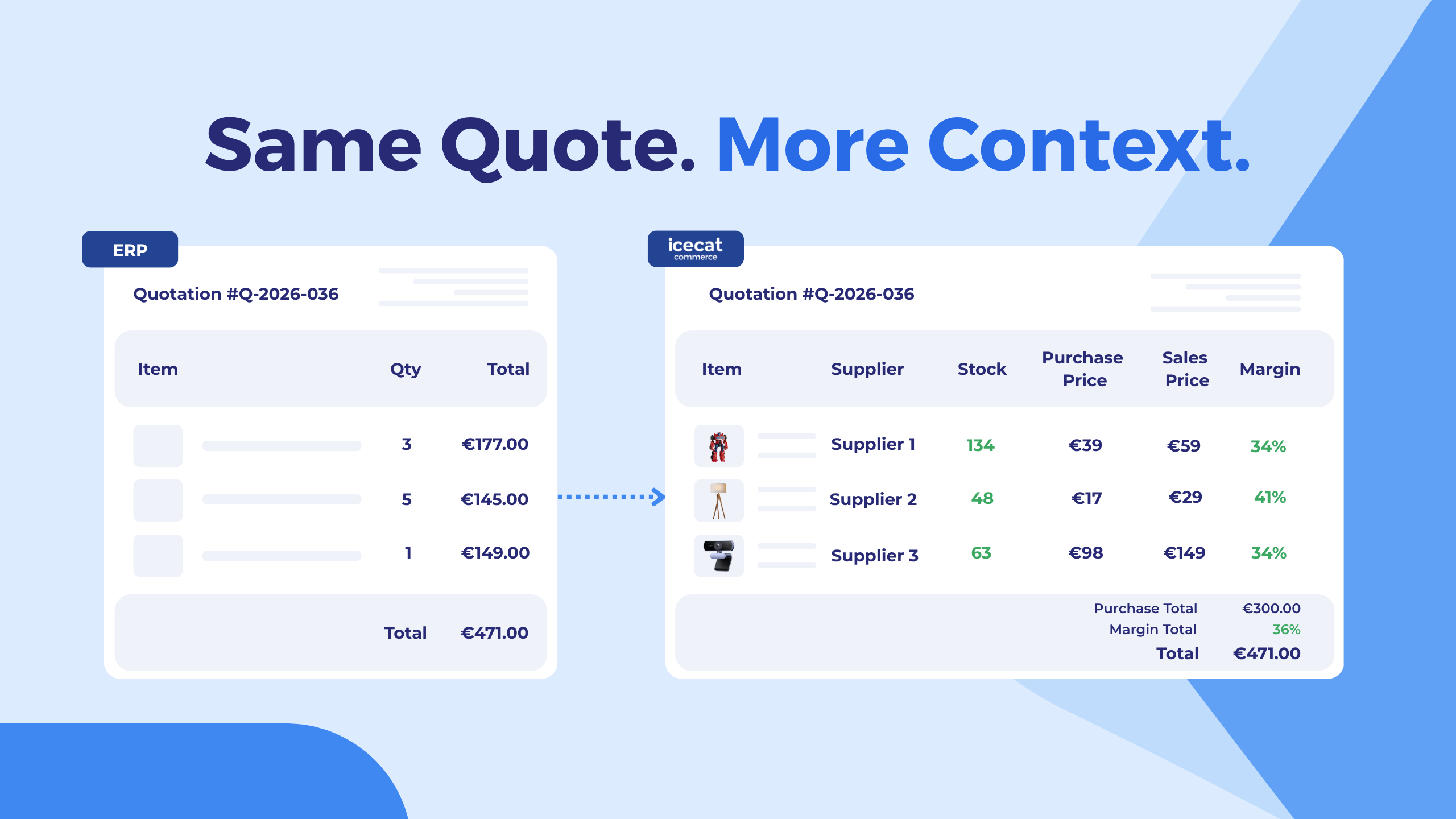
Building a quote in an ERP sounds straightforward until the information you need is somewhere else.
The customer and quotation may already be in the ERP, but the product you want to add is missing. A supplier changed its price. Stock differs between warehouses. The richer product information sits in the PIM. Before a salesperson can finish the quote, they are checking another screen, another export, or another system.
That is the problem Quote Pages are designed to solve.
Quote Pages are an ERP quoting interface that brings an existing ERP quote together with product, supplier, price, and stock information from Icecat PIM. Users can review and edit the quote in a dedicated view and then send the result back to the ERP.
The first integration has been developed and tested with Odoo for both sales and purchase quoting. The interface itself is hosted by Icecat PIM, but the user enters it directly from the ERP through a secure authenticated link. There is no need to open the regular PIM interface or maintain a separate PIM workflow.
Why ERP quoting becomes difficult when product data lives elsewhere
An ERP is usually the right place to manage a sales quote or purchase quote. It knows the customer, the quote status, the commercial process, and what eventually becomes an order.
But that does not mean the ERP holds every piece of product information needed to make a good quoting decision.
A few common situations make ERP quoting more complicated:
- A product is available in the PIM but has not yet been created in the ERP.
- Product images, specifications, and other catalog information are maintained in the PIM.
- Supplier prices have changed since the ERP was last updated.
- Stock differs between suppliers or warehouses.
- A salesperson wants to compare several supplier options before committing to one.
- Information has to be copied manually between the ERP, PIM, supplier portal, or spreadsheet.
None of these problems is especially dramatic on its own. The friction comes from having to repeat the process line after line and quote after quote.
What are Quote Pages?
Quote Pages are dedicated quote-editing views that connect an ERP quote with information available in Icecat PIM.
When a user opens a quotation from the ERP, Quote Pages retrieve the current quote from the ERP. Existing products, quantities, prices, customer or supplier information, and the quote status come with it.
The quote lines are then cross-referenced with products in Icecat PIM. Where a match is available, the user can see additional information such as product data, warehouses, stock, and supplier pricing.
The important part is that Quote Pages do not create a second quotation system.
The quote itself remains in the ERP. Quote Pages retrieve it for the editing session, let the user work with the additional PIM data, and send the changes back when the quote is saved. No separate copy of the quotation is maintained in PIM.
How does the ERP quoting workflow work?
In practice the workflow is only a few steps: open the quote from the ERP, match its lines to Icecat PIM, review price, stock, and margin, and save the result back.
Open the quote from the ERP
The workflow starts where the user is already working: the ERP.
In Odoo, the quotation can open Quote Pages in a new browser tab through a secure signed authentication link. The token identifies the relevant quote, quote type, and source system so the correct data can be loaded automatically.
Users do not need a separate login for the process. Authentication is handled through the configured service account behind the Quote Pages flow.
For the salesperson or buyer, that means there is no need to search for the same quote again after switching systems.
Match ERP quote lines with PIM products
Once the quote loads, its product lines are cross-referenced with Icecat PIM using the available mappings and product identifiers.
When a product can be matched, Quote Pages can add the relevant PIM information to the line.
If a product from the ERP cannot be matched, the quote line does not disappear. The information received from the ERP remains visible, and the user can search for the correct PIM product manually.
The same product search also makes it possible to add a PIM product that is not yet present on the ERP quotation.
See supplier price, stock, and margin while quoting
The sales quote view shows commercial data at the point the quote is being built.
Depending on the available product and supplier data, a quote line can show information such as:
- product image, brand, and MPN
- selected supplier or warehouse
- stock
- when stock was last updated
- purchase price
- when the purchase price was last updated
- sales price
- margin
- quantity
- line total
- recommended retail price
- restock information
- bid information (manual entry)
Stock shown on Quote Pages comes from the most recent supplier data imported into the PIM, not from the ERP. Each value carries a timestamp showing when it was last updated, so users can see how recent it is.
Compare suppliers without leaving the quote
For sales quotes, the same product may be available from several suppliers or warehouses.
Instead of checking those options separately, the user can open a supplier comparison for the individual quote line.
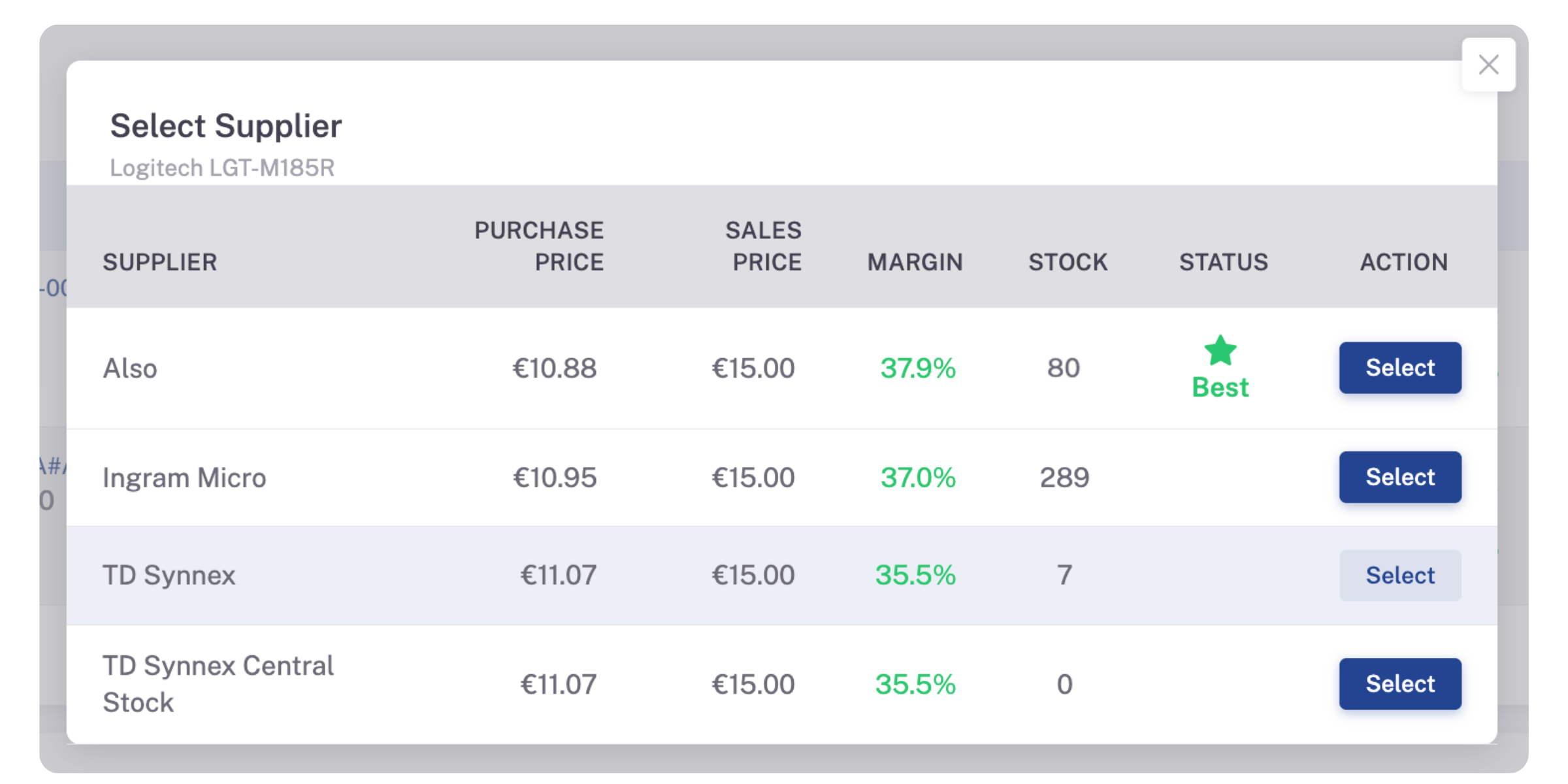
Illustrative screenshot: suppliers, prices, stock, and margins shown are examples only and do not reflect real availability, pricing, or any supplier recommendation.
The comparison can include purchase price, sales price, margin, available stock, and active bid information (manual entry). The warehouse with the highest margin can be highlighted as Best, while the user can still choose another supplier if availability or another commercial reason matters more.
Quote Pages do not automatically optimize the entire basket and decide where every line should be purchased. They give the user better information for the supplier decision on each quote line.
As prices, quantities, or suppliers change, the quote summary recalculates purchase total, margin, and sales total. That makes it easier to see what an individual pricing decision does to the quote as a whole.
ERP quote management should also respect quote status
A draft quote and a confirmed order should not behave in exactly the same way.
Quote Pages therefore follow the state of the quote in the ERP and change the available editing options accordingly.
For an RFQ or draft quote, users can add and remove lines, replace products, change suppliers, and adjust quantities or prices.
Once the quote reaches the Order state, the structure is more restricted. Products and suppliers cannot be changed, and lines cannot be added or removed. Prices and quantities can still be adjusted.
A Locked quote is read-only.
This keeps the ERP workflow in control rather than creating a parallel set of permissions inside the quoting interface.
What happens when a product is not yet in the ERP?
This is another common problem in ERP quoting: the product a salesperson wants to offer exists in the catalog or PIM, but nobody has created it in the ERP yet.
Quote Pages can handle that during the save process.
If a PIM product has been added to the quote and does not yet exist in the ERP, a product record can be created in the ERP when the quotation is saved.
Where the product’s brand or category already exists in the ERP, Quote Pages can link those existing values. They do not automatically create new brands or categories just because they are present in PIM.
That allows the quote to move forward without turning Quote Pages into a full product synchronization process.
Sales quotes and purchase quotes work differently
The basic ERP quoting workflow is similar for sales and purchasing, but the decision being made is different.
Sales quotes
For a sales quote, the user may have several possible suppliers for the same product.
The sales view therefore focuses on comparing supplier options, purchase cost, stock, sales price, and margin.
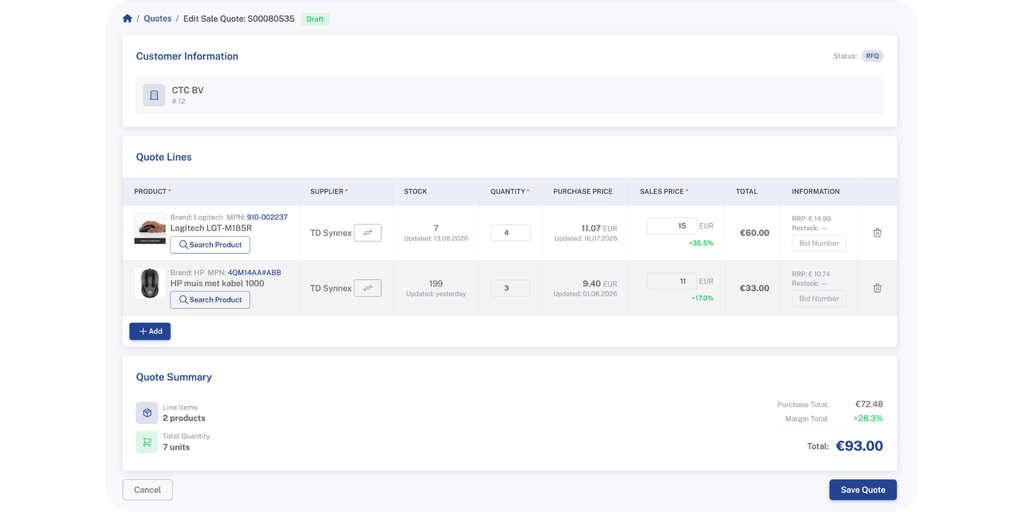
Sales quote view. Illustrative example; suppliers, prices, and margins are sample data only.
Purchase price acts as the cost reference, while the sales price can be adjusted. Margin is calculated alongside it, and warnings can draw attention to cases such as a sales price falling below purchase cost or a requested quantity exceeding the displayed stock.
The salesperson still decides what to do with that information.
Purchase quotes
A purchase quote already has a vendor.
Because of that, there is no need to compare suppliers in the same way. The vendor is fixed, and product search is limited to products available for that supplier.
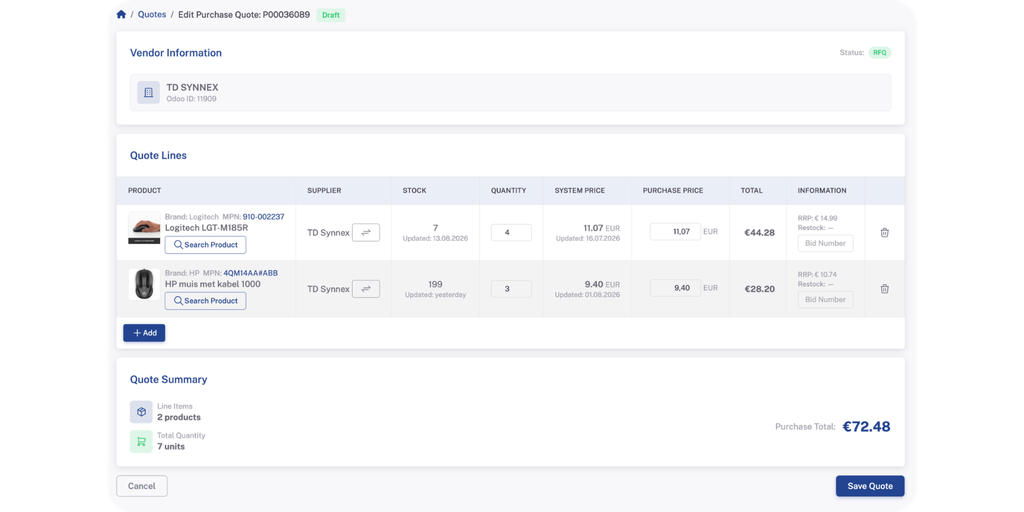
Purchase quote view. Illustrative example; vendor and pricing shown are sample data only.
The purchase view also uses purchase price as the editable commercial value, with the system price available as a reference.
The interface remains familiar across both workflows, but the controls reflect the job the user is actually trying to do.
Why connect PIM and ERP for quoting?
Each system is left to do what it is designed for. The ERP stays responsible for the quote, its status, and the commercial workflow; the PIM supplies the product, warehouse, and supplier context the ERP does not hold.
For sales and purchasing teams, that translates into less manual copying, faster access to product and supplier data, easier supplier comparison, and margin visible while pricing – with one authoritative quote that remains in the ERP.
Quote Pages are hosted on Icecat PIM but open directly from the ERP through the authenticated connection, so users stay in their normal quoting flow.
ERP quoting with Odoo today, and other ERPs in the future
Odoo is the first ERP for which Quote Pages have been developed and tested across sales and purchase quote workflows.
The interface itself, however, is not intended to be limited to Odoo.
The quote editor, product matching, supplier comparison, and save-back flow have been designed as a reusable layer. The current Odoo integration already allows system-specific supplier and supplier-price fields to be configured rather than hardcoded.
For another ERP or back-office platform, the API connection, field mappings, and workflow rules would need to be adapted to that system. The Quote Pages interface does not have to be rebuilt from the beginning for each integration.
Exactly what can be supported will depend on the ERP and the APIs it exposes.
The underlying workflow stays simple:
Open the quote in the ERP, bring in the relevant PIM and supplier information, make the quoting decisions, and save the result back to the ERP.
Are Quote Pages relevant for your ERP quoting process?
Quote Pages are most useful when the quotation and the product information needed to complete it live in different places.
They may be worth looking at if your team:
- creates sales or purchase quotes in an ERP
- regularly checks stock or supplier prices in another system
- works with multiple suppliers or warehouses
- has products in the PIM that are not always present in the ERP
- wants margin and purchase cost visible while preparing sales quotes
- spends time copying product or supplier data into quotations
- wants the ERP to remain the system of record
If that sounds familiar, contact our team about how Quote Pages could fit into your ERP quoting workflow.

Elisabeth is part of the MarCom team at Icecat Commerce, where she combines technical product knowledge with real-world client situations. Having worked directly with clients on their product data challenges, she writes from the perspective of what actually matters in day-to-day e-commerce operations.